Free character card viewer for SillyTavern, Chub, and Tavern PNGs See what’s inside any character card.
Open a card from SillyTavern, Chub, RisuAI, or any app that speaks the Tavern format, and read everything it carries: the definition, every greeting, example dialogue, hidden instructions, and the lorebook. The card is read in your browser and never uploaded unless you import it.
- Formats
- PNG, JSON, CHARX
- Privacy
- Read in your browser
- Cost
- Free, no account
Drop a character card
PNG, JSON, or CHARX cards from SillyTavern, Chub, Janitor AI, RisuAI, and any app that uses the Tavern format.
Read in your browser. Nothing is uploaded until you import.
The short answer
How do I open a SillyTavern character card PNG?
Drop the PNG on LoreWeaver’s free character card viewer. A Tavern card keeps the character inside the image as a text chunk of base64-encoded JSON, and the viewer decodes it in your browser, then lays out every field: description, personality, scenario, greetings, example dialogue, instructions, creator notes, and the lorebook. JSON and CHARX cards open the same way, with no account, and nothing is uploaded unless you import the character.
Updated
- bytes uploaded while you read: the file stays on your device
- 0
- file types: PNG, JSON, and CHARX
- 3
- the newest card spec, read alongside V1 and V2
- V3
- the largest card file the viewer opens
- 25 MB
What the viewer shows
Every field, in reading order.
Here is the viewer reading a sample card. A card you open lays out the same way below the panel, with one line on what each part does and every macro marked.
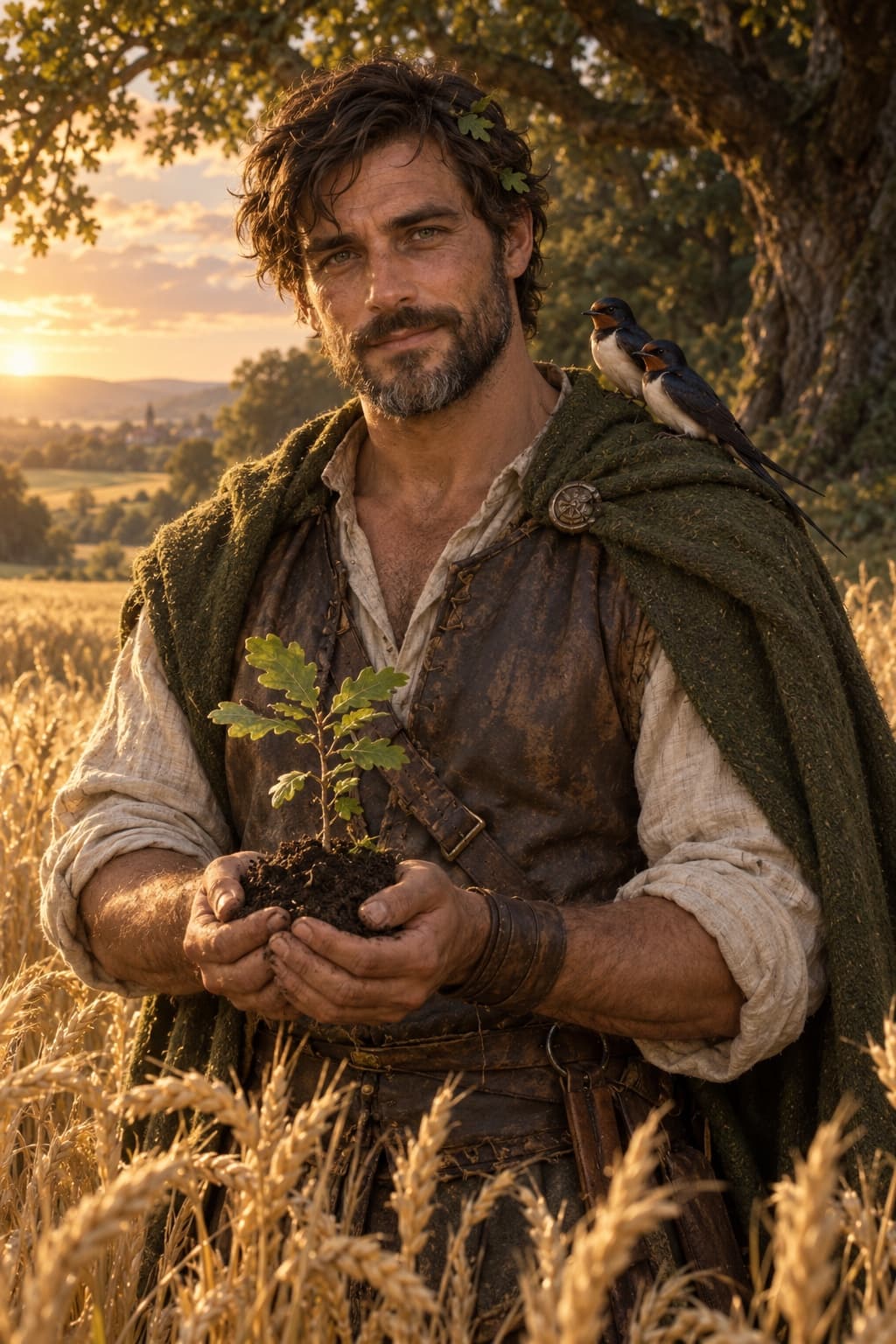
Sample card · ned-hayward.png
Ned Hayward
01DefinitionWho the character is. Apps send this text to the storyteller with every reply.
Description
{{char}} is the hayward of Fennick, thirty-six. He keeps the village hedges and common fields and impounds stray cattle, and at dusk he walks the boundary hedge, because past it is the Old Wood, where the Fair Folk live. He is broad and sun-browned, with a short dark beard going grey at the chin, green-grey eyes and oak leaves caught in his hair. Swallows nest in his barn and follow him around the fields.
Personality
Patient, dry and slow to speak. Kind to animals, short with people in a hurry. A widower who laughs rarely and all at once. Polite to the Fair Folk and never trusts them.
Scenario
At dusk, {{user}} cuts across Fennick’s common wheat after something that bolted into the field, and the hayward is standing at the edge of the furrow.
02Greetings3Each greeting opens the story a different way. The first is the default.
First message
*He doesn’t move from the gap in the hedge, just watches you push through the wheat.* Whatever you were chasing went under the hedge a while ago. You’re standing in the miller’s wheat, and he’ll want to know who flattened it.
Alternate greeting 1
*Rain on the barn roof. {{char}} sits in the open doorway with a lantern on one knee and a swallow on the beam above him.* You may as well wait it out in here. Mind the cart, the wheel’s off.
Alternate greeting 2
*He holds out a scythe, handle first.* Harvest starts at first light. If you’re staying in Fennick, you’re working.
03Example dialogueThe voice, shown by example rather than described.
Example messages
<START> {{user}}: Who planted all of this? {{char}}: My grandfather laid the hedge. The wheat’s the miller’s. I keep the cows out of both. <START> {{user}}: Are you angry with me? {{char}}: *He looks at the flattened wheat for a while.* No. Mind where you put your feet on the way out.
04InstructionsDirections for the storyteller that never appear in the chat.
System prompt
Write {{char}} in short, unhurried sentences. He never raises his voice.
Post-history instructions
Keep the story in Fennick and its fields unless {{user}} gives {{char}} a reason to go past the hedge.
05Creator notesWhat the creator wants people to know before they play.
Notes
Best as a slow, cozy story with an edge. Help with the harvest and Ned starts telling you the old names of the fields, and why nobody crosses the hedge after dark.
06Lorebook12Entries that join the story when one of their keys comes up.
Fennick
Keys: Fennick, village
A farming village of forty roofs in a river bend, with a mill on the river and an alehouse called the Plough. The Old Wood starts at its northern hedge.
The hayward’s oathAlways on
Keys: oath, hayward
{{char}} swore at Lammas to keep Fennick’s hedges and common fields for as long as he can walk them. He won’t leave them for long, whatever he is offered.
The swallows
Keys: swallow, swallows, birds
Swallows nest in {{char}}’s barn every summer and follow him around the fields. He worries when they’re late back in spring.
The harvest
Keys: harvest, scythe, sheaf
Harvest takes nine days. The men cut and everyone else binds, and the whole village eats at the long table in the tithe barn on the last night.
Mother Ashby
Keys: Mother Ashby, Ashby
The village wise woman, seventy-odd, who sets bones and sells charms. The only person in Fennick who argues with {{char}} and wins.
The river
Keys: river, ford
Slow and brown in summer, fast in spring. The ford floods twice a year, and {{char}} ropes people across.
The Old Wood
Keys: Old Wood, wood, forest
Oak and holly older than the village, on the far side of the boundary hedge. The Fair Folk live there, and nobody from Fennick goes in after dark.
The Fair Folk
Keys: Fair Folk, fairies, good neighbours
Tall, polite and very literal. They hate iron and broken promises. They borrow things, and sometimes people.
The tithe barn
Keys: barn, tithe
Where the village keeps its grain and holds its feasts. {{char}} sleeps there some nights at harvest to keep the rats down.
Joan
Keys: Joan
The sister of {{char}}’s late wife. She thinks it’s time he married again and tells him so most Sundays.
The pound
Keys: pound, strays
A walled pen by the green where {{char}} keeps stray cattle until their owners pay a penny a head to have them back.
AnnisDisabled
Keys: Annis
{{char}}’s wife, who died three winters ago. He doesn’t talk about her.
Private by design
Read in your browser, never on a server.
A character card is a file on your device, and it stays there. The viewer decodes it with code running in this tab, so no copy of the card reaches LoreWeaver while you read it.
The card is uploaded only if you press Import. Signed out, it waits in this browser tab while you create a free account, and My Stuff offers to import it once you are in.
The picture
What every app shows
tEXt chunk · chara
The card, base64 encoded
Decoded on your device
What the viewer lays out
- Uploaded
- Nothing, until you import
Formats
Every card file the viewer opens.
| File | Where the character lives | What you see |
|---|---|---|
| PNG card, V1 or V2 | Base64 JSON in a text chunk named chara, hidden inside the image | The portrait, every field, and the lorebook |
| PNG card, V3 | A ccv3 chunk, usually beside a chara copy for older apps | The V3 copy, which the viewer reads first |
| JSON card | The same card object, saved as plain text | Every field and the lorebook, without a portrait |
| CHARX archive | A zip holding card.json and the card’s images | The card, with its main portrait |
| Embedded lorebook | A character_book inside V2 and V3 cards | Each entry with its keys, and whether it is always on or disabled |
Cards up to 25 MB. Lorebooks show up to 1,000 entries, and entries with no text are skipped.
Step by step
Read a character card in four moves.
- 01
Find the file
Get the card itself.
Download the PNG card from Chub, export a PNG or JSON card from SillyTavern, or take the CHARX file from RisuAI. A screenshot of a card will not work; it needs the original file.
- 02
Open it
Drop it on the panel.
Or press Choose a card. The viewer looks for card data inside the file and decodes it on the spot, without sending it anywhere.
- 03
Read it
Every part, in order.
The card’s details and contents come first, then each part in its own section, with template macros such as {{user}} marked so you can see where names will go.
- 04
Play it
Import it, if it earns it.
One press of Import turns the card into a private character world with memory. Until then, the card never leaves your browser.
Questions
Character cards, explained.
01What is a character card?
A PNG image, JSON file, or CHARX archive that carries an AI character: description, personality, scenario, greetings, example dialogue, and often a lorebook. SillyTavern, Chub, RisuAI, and many other apps share characters this way.
02How do I read the data inside a character card PNG?
Drop the PNG on this page. The character is stored inside the image as base64-encoded JSON in a text chunk named chara (or ccv3 for V3 cards), and the viewer decodes it in your browser and lays out every field.
03Is my card uploaded anywhere?
No. The viewer reads the file in your browser. The card is uploaded only if you press Import, and then it becomes a private character world in your own account.
04Which formats does the viewer support?
Tavern cards in the V1, V2 (chara_card_v2), and V3 (chara_card_v3) specs, as PNG images, JSON files, or CHARX archives up to 25 MB. Lorebooks show up to 1,000 entries; entries with no text are skipped.
05Why does my PNG say it does not hold a character card?
The image has no card data inside it. That happens when a portrait is saved, cropped, or shared without the card text, since many sites strip it. Download the card again from its source, or export it from your app as a PNG or JSON card.
06What do {{char}} and {{user}} mean in a card?
They are placeholders. Apps replace {{char}} with the character’s name and {{user}} with yours when the story runs. The viewer marks them, along with older forms such as <USER> and <BOT>, so you can see where names will go.
07Can I view Janitor AI characters?
Janitor AI has no export. If the creator also shares the character as a Tavern card, on Chub or elsewhere, download that file and open it here.
08Can I edit a card here?
No, the viewer is read-only. To change a character, import it into LoreWeaver and edit its definition, greetings, and lore cards there.
Keep exploring